IP Blocker Support
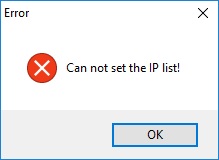
If you receive this message, IP Blocker Firewall will not work. In most cases, it is because of cracked IP Blocker Firewall. There have been reports of massive ransomware network traffic on cracked IP Blocker Firewall. BeeThink is not responsible for any losses caused by cracked software.
This is becasue the current user does not have the privilege to write file on C:\Program Files(x86)\IP Blocker Firewall\ folder. You may change the privilege or reinstall this application on disk D:\ to avoid this error.
IP Blocker can not be successfully uninstalled on windows operating system sometimes. In this case, you have to kill the uninstalling program manually by Windows task manager, and then try uninstalling program again. IP Blocker will be successfully removed on the second try.
If you click the "Block" button and set the blocking rule to block the "OTHER" protocol, you will not connect to the Internet correctly.
Sure. Please email us at [email protected].
Please email us at [email protected].