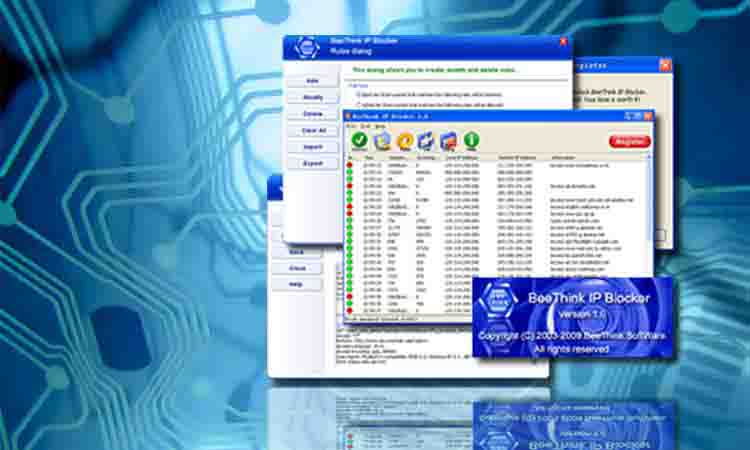
IP Blocking Software
Stop unwanted IP addresses in one-click. Try the best IP network traffic blocker for free!
IP Blocker Free download Buy now!- Block network packets from specific IP addresses or address ranges
- Stop unwanted country IP addresses
- Real-time network monitoring and detection
- Lighter than ever, only 2 MB. No lag, robust and stable.
- Best alternative to Windows Firewall
- Support Application Programming Interface
What is IP Blocker Firewall?
IP Blocker Firewall is Windows IP blocking software that prevents unwanted network traffic from entering a network or computer. It can be used successfully on Windows server machines, and in production environments, to easily block IP addresses or visitors using rules based on IP address, port, protocol and other TCP/IP factors. With a powerful real-time network monitoring interface, users can manage blocked and allowed IP addresses in a "what you see is what you get" manner. New version adds support for Windows 11 and Windows Server 2022.
Full Version Information
- Current Version: 6.1.0.0
- Release Date: March 12, 2023
- OS supported: Windows
- File Size: 2 MB
- Trial Limitations: 3-day free trial
- Price: $69.95

IP Blocker Firewall features
- Black list and white list. IP Blocker firewall controls users' access to the Internet in a specific area by setting a blacklist or whitelist.
- Support multiple IP list formats, such as country IP Address List.
- Filter network packets based on IP address, port, protocol and other TCP/IP factors
- Programmatic interface that supports importing IP lists from third-party applications
- Monitor network activity in real-time
- Run IP Blocker as a Windows service
- Automatically update IP blocking list
- Exceptional rules
- Look up remote IP addresses and ownership information
- Log files
What, Why & How
- What is an IP address?
- What is IP address Blocking?
- Why block bad IP addresses?
- How does IP Blocker Firewall work on Windows?
- How to use IP Blocker Firewall
- How to Block an IP Address on Windows
- How to Ban Country IP Addresses
An IP address is a 32-bit number (IPV4) or a 128-bit number (IPV6) assigned by ISPs. IP addresses are like phone numbers and can be used to make or receive "phone calls" from other network devices. When network devices send one-way network packets to other devices, the IP addresses in those packets can be forged. However, if two network devices are to establish bidirectional communication (TCP), their IP addresses must be real. Find more on IP address.
IP address blocking is a service that blocks IP network traffic through a network device or computer. The service can be a software program or configuration on network hardware. For Internet security, IP address blocking is an essential tool for protecting Internet servers and personal computers. See more on IP address Blocking.
This is because network traffic from these bad IP addresses can harm your Internet server or personal computer in many ways. For small Internet server owners and large corporations, they are increasingly facing DDoS attacks, DoS attacks, SQL injections and even threats from inside. Hackers are spying on you, stealing your data and taking down your servers. For personal computers, they can be attacked by spyware, surveillance tools or ransomware. Monitoring and analyzing network packets by IP Blocker Firewall or Wireshark is the first step in finding an enemy. Then just blacklist bad IP addresses and block them.
IP Blocker Firewall works as a Windows system network filter placed in the TCP/IP stack. Some firewall software programs implement their IP filtering functions at upper layers such as the transport layer, so not all network packets can be filtered. With IP Blocker Firewall, the IP filter is at a lower layer (the data link layer) and no network packets can bypass it. When a packet passes through the IP Blocker firewall filter, it checks the user-defined firewall rules and decides whether to let it through or drop it.
Tips
- Build your own blacklist programmatically
- Monitor, analyze and block
- Detect spyware by BeeThink IP Blocker
- Exceptional rules
Importing IP addresses into the blacklist via the API has many requirements. One case is when network administrators discover suspicious network traffic through log files. They want to stop IP addresses in real-time via software. IP Blocker Firewall provides software developers with an easy-to-use API and custom configuration. Please find more on How to import IP addresses by command line. If you still have any questions in using IP Blocker programming interface, please contact us.
Best practices for IP blocking require at least three steps. The first step is monitoring. Network administrators should be aware of what is happening on their computer network. They need to understand how legitimate and illicit web traffic behaves. Second, analyze abnormal situations. Find suspicious network packets and investigate using network tools. Wireshark provides users with most of the details of their network. BeeThink IP Blocker doesn't provide that many details, but it shows most of the information users need. In addition to this, BeeThink IP Blocker displays network activities in real-time, which are well organized for users to view. Last but not least, use BeeThink IP Blocker to block them.
BeeThink IP Blocker can not only block bad IP addresses, but also reveal traces of spyware. When spyware hosts your computers, they find ways to send information. Click here to read more on how to use BeeThink IP Blocker to detect spyware.
When users want to keep their server open to their remote control computer at all times, despite their own IP address being on the IP block list, an "exception rule" can be introduced to achieve this. Please find what IP Blocker rules working flow is.